
What is Cirium?
Cirium® is the world’s most trusted source of aviation analytics. The company delivers powerful data and cutting-edge analytics to empower a wide spectrum of industry players.
JCDecaux and Displayce have the exclusivity to integrate Cirium live airport data to trigger DOOH campaigns based on arrival, departure and airline data.
How can I see the Airport trigger in step 3 (buying)?
1) You need to have at least one screen located in an airport in your targeting in step 2
It can be done through several ways:
- Use the targeting tools on the side panel (Geolocations/Screens characteristics):
- Google POI - use the search bar to find the airport within the 'Places' filter powered by Google, and then increase the perimeter around the pin point if needed,
- Venue types - use the venue type Transit > airports,
- Locations filter - you can search for the closest city near the airport to select airport screens (depending on the targeted airport, this will not be the most reliable option),
- Use the tools on the map:
- Polygon tool - draw the outline of the airport using the dedicated 'polygon' tool on your map,
- Radius tool - draw a circle around the airport using the 'radius' tool on your map, and then increase or decrease the radius.
2) You need to have at least one deal that contains at least one screen located in the airport
Only then you will see the Airport trigger in step 3.
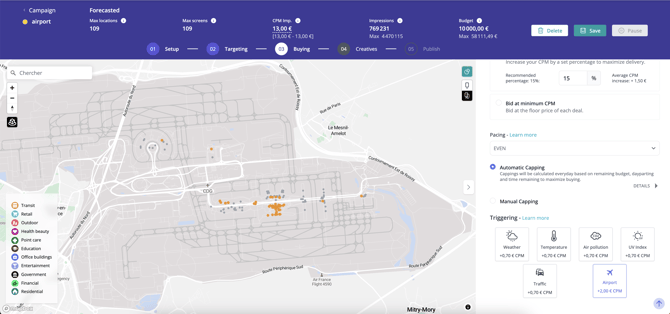
When using an 'airport' trigger in your line item, we recommend not adding any extra screen targeting (apart from the airport itself) or any other data.
The trigger already acts as a filter in step 3, so adding targeting or data options might make the screen selection too restrictive or incompatible with the 'airport' trigger filter. It's best to keep it simple by just selecting the venue type 'transit > airport,' for example.
Trigger coverage
Not all airports are covered by the CIRIUM trigger
For the moment, a handful of airports have been modeled in such a way as to be able to manage screen activation based on CIRIUM data. Note that the airport trigger is available exclusively for JCDecaux screens.
The airports in question are:
- France >
- Paris Charles de Gaulle (CDG)
- Orly (ORY)
- Bordeaux (BOD)
- Lyon (LYS)
- Montpellier (MPL)
- Marseille (MRS)
- Nice (NCE)
- Nantes (NTE)
- Toulouse (TLS)
- Biarritz (BIQ)
- Strasbourg (SXB)
- Lille (LIL)
- BENELUX > Brussels (BRU) and Luxemburg (LUX)
- United Kingdom > London Heathrow (LHR)
- Germany >
- Frankfurt (FRA)
- Hamburg (HAM)
- Stuttgart (STR)
- Cologne (CGN)
- UAE > Dubai (DXB)
- Brazil > São Paulo/Guarulhos (GRU)
- Italy >
- Milan Bergamo/Orio al Serio (BGY)
- Milan Linate (LIN)
- Milan Malpensa (MXP)
- Genoa Cristoforo Colombo (GOA)
- Turin Caselle (TRN)
- Australia >
- Sydney Kingsford Smith Airport (SYD)
- Singapore >
- Singapore Changi Airport (SIN)
- Hong Kong >
- Hong Kong International Airport (HKG)
- Macau International Airport (MFM)
Modeling work is constantly underway for other airports, and we'll report back as soon as a new one is ready.
Targeting specifications
Frames selection and targeting
The CIRIUM trigger acts as a filter on selected frames in the forecaster, differing from classic triggers like weather or traffic. Here's how it works:
1. Frame Filtering- When you reach step 3 of your line item setup, you see a number of maximum screens in your forecaster.
- Adding an Airport trigger (Flights from/Flights to) reduces this number, filtering screens to match flights from/to the selected country.
- 🛫 Trigger 'Flights to' (departures): 'Only screens located in airports that have existing routes to the destination country have been selected.'
- 🛬 Trigger 'Flights from' (arrivals): 'Only screens located in airports that have existing routes from the country of origin have been selected.
- 🧑✈️ Trigger 'Airlines': 'Only screens located in areas frequented by passengers traveling with chosen airlines have been selected.'
- The list of countries, airports (To/From) and airlines is based on information from the day we make production data available, updated every 30 minutes.
- This ensures the data is always current, reflecting all open routes and active airlines at modeled airports.
- Frames are selected if they have been at targeted locations via arrivals or departures.
- Once added, countries, airports and airlines remain in the database permanently.
Only direct flights are shown in the 'Flights from' and 'Flights to' options. Connecting flights are not available.
Airport granularity:
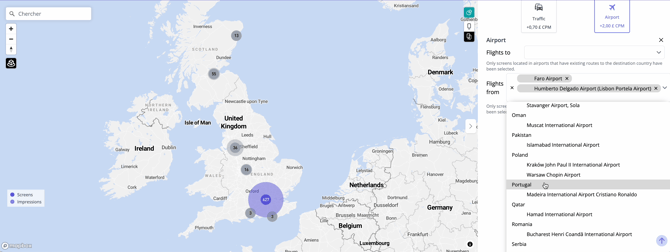
Starting from 7 oct. 2024, you can use airport triggers for specific airports: for example, if you need to set a trigger for a campaign within London Heathrow that targets passengers from Faro and Lisbon airports, you can now select those airports directly. Within the drop down, you will still be able to select country level, and you will also have a list of airports within these countries.
Granularity over screen activation
Screen categories include terminal, gate, check-in and luggage belt.
For the moment, all screens are activated 'at the same time'.
In the meantime, the type of route modeled is:
- Airport entrance → public shopping areas → departure gate
- Arrival gate → public transfer areas → luggage belts → airport exit areas → off-airport areas for public transport (train / metro / bus; if available in inventory)
Trigger temporality
[-30 min; +2h ], depending on arrival/departure targeting.
The default activation time is 2h30.
- Arrival: 30 minutes before the plane lands, 2 hours after it has landed.
- Departure: 2 hours before the plane takes off, 30 minutes after it has took off.
Delays
Arrivals: Even if the flight is delayed, we will adapt activation time accordingly, meaning we will have 2.5 hours of activation.
Departures:
- If the departure delay is announced more than 2 hours before the scheduled departure time, the activation time will adjust (shift accordingly).
- If the delay is announced within 2 hours before departure, frames will be activated for longer.