
How to access it
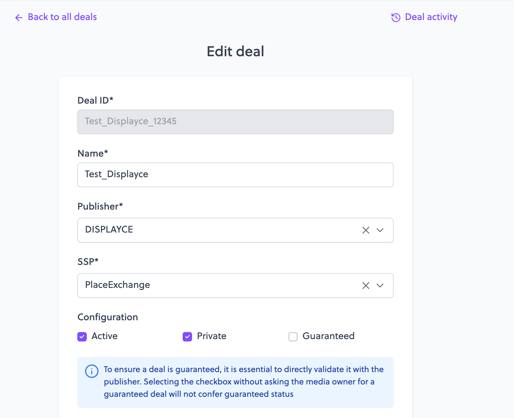
- Open an existing deal.
- Click the Deal activity button (history icon) at the top right of the page.
- A modal opens with the deal’s full history.
What you see
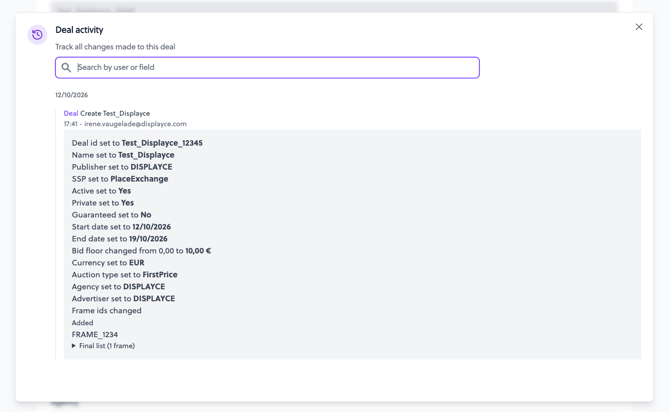
Each action on the deal is listed from newest to oldest. Each entry shows:
| Element | Example | Description |
|---|---|---|
| Action type | Deal Create / Deal Update | Whether the deal was created or edited |
| Author | user@agency.com | Email of the user who made the change |
| Date | dd/mm/yyyy | When the change was made |
| Changes | Name changed from X to Y | The edited field, with its previous and new value |
Tracked fields
- Deal ID
- Name
- Publisher
- SSP
- Active
- Private
- Guaranteed
- Start date
- End date
- Bid floor
- Currency
- Auction type
- Agency
- Advertiser
- Frame IDs
Active, Private and Guaranteed are displayed as Yes/No. Bid floor is displayed with its currency.
Searching the log
Use the search bar at the top of the modal to filter entries:
- By user: see all changes made by one person.
- By field: see all changes to one field, for example Bid floor.
Limitations
- Older deals: deals created before this feature was released don’t have a Deal Create entry. Their history may start with a Deal Update.
- Read-only: the log can’t be edited.