
More than a simple report, it puts performance into perspective, explains the campaign's success factors, and helps agencies demonstrate the value of DOOH to their advertisers.
When can I generate a report?
- The campaign must be Finished.
- Re-running any line item makes the report temporarily unavailable again until the campaign is finished once more.
- If a campaign has several line items and only some are finished, you still can't generate a report — the whole campaign needs to be in Finished status. A partial report isn't possible.
- Access depends on your agency's service type:
- Managed agencies: included for free.
- Self-service agencies: available as a paid service.
How do I generate a report?
- Open your finished campaign and click the Share dropdown. You'll now see two options:
- Media plan — the previous Share page, used to share the campaign before it goes live.
- ProveMe report — select this one.
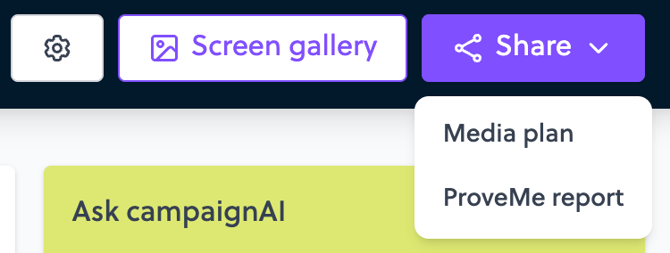
- The report takes a little while to build; you'll see a progress message while it's generating.
- Once it's ready, you'll get a notification — click Open to view it, or reopen it anytime afterward from the Share dropdown.
What's in the report?
The report has 7 pages:
- Cover page — dates and campaign objective.
- Global performance — spend, impressions, plays, screens, locations.
- Top creatives — the 3 creatives that received the most spend.
- Budget — spend vs. objective (based on the campaign's maximum budget if one is set, otherwise on the line item budgets).
- Impressions breakdown — when and where the ads ran (by hour/day, venue type, publisher).
- Map — where the screens were
- Campaign breakdown — the details, split by line item.
The KPIs shown follow the same display rules as your Campaign Summary. ProveMe currently works well for campaigns fully in euros; other currencies aren't handled yet.
How to edit the report before sharing it?
- Click Edit to enter edit mode.
- Double-click any text (paragraphs, campaign name, objective) or image (global performance) to change it.
- The "Include agency markup" checkbox (checked by default) lets you show or hide your agency's fees in the numbers.
- The eraser icon restores the original AI-generated version — since this can't be undone, you'll be asked to confirm first.
- Edits are visible to everyone

The written parts of the report are generated automatically by AI, based on your campaign's real data, with safeguards so it doesn't invent things (for example, it won't mention a country that wasn't actually part of the campaign).
How do I share the report?
You have two options:
-
Shareable link
-
- You choose which pages to include.
- Anyone with the link can view it, no account required.
- The link stays active indefinitely — it doesn't expire.
- The link is "live": if you regenerate the report, the same link automatically reflects the latest version after a refresh.
- PDF export
- A static snapshot of the report at the moment it's generated. To reflect a specific configuration (e.g. without agency fees), set the page to that configuration before exporting.
- Display can vary slightly depending on the browser and PDF reader used.
A quick review of the report is always recommended before sharing it externally.
Limitations & Known Behaviors
- The numbers are calculated once, when the report is generated, so they stay consistent every time you reopen it — and they should match your Campaign Summary.
- Amounts are shown in euros only for now; the exchange rate applied is the one in effect at the time of purchase.
FAQ
Why can't I open the ProveMe report for this campaign?
→ Either the campaign isn't finished yet, or a line item is running again after the report was generated. It becomes available once the campaign is finished again.
The numbers don't match my Campaign Summary — why?
→ They're supposed to match. If you notice a discrepancy, let your Displayce contact know.
Are my edits visible to my whole team, or only to me?
→ Visible to everyone at your agency with access to the campaign or the shareable link
Does the shared link expire?
→ No, it stays active indefinitely.
If I regenerate the report, does my previously shared link still point to the old version?
→ No — the link is "live" and automatically reflects the latest version of the report.
My campaign has several line items and only some are finished — can I get a report for just those?
→ No, the whole campaign needs to be in Finished status; a partial report isn't possible.