
What is the Agency Currency?
The currency associated with the agency at account level. It's used as the billing reference. By default, it pre-fills the campaign currency field when creating a new campaign — but campaign currency and agency currency don't have to match.
4 available currencies — USD / GBP / EUR / BRL
What is the Campaign Currency?
The Campaign Currency is used for:
-
Converting service costs
-
Showing budgets and expenses across different platform pages
-
Defining the currency of the Max Budget
17 available currencies — AUD / BRL / CAD / CHF / CNY / DKK / EUR / GBP / HKD / INR / JPY / MXN / NOK / SEK / SGD / USD / ZAR
The campaign currency is editable as long as no LI in the campaign is published (status ≠ Planned / Running). Make sure to choose the right currency before publishing.
What is a mono-currency campaign?
A campaign is considered mono-currency when all active (i.e. published) line items are set in the same currency — and that currency is the same as the campaign currency.
⚠️ If your campaign includes published line items in multiple currencies, it will be considered multi-currency — and some platform features like KPI display in the Campaign Summary will no longer be available.
How does it work?
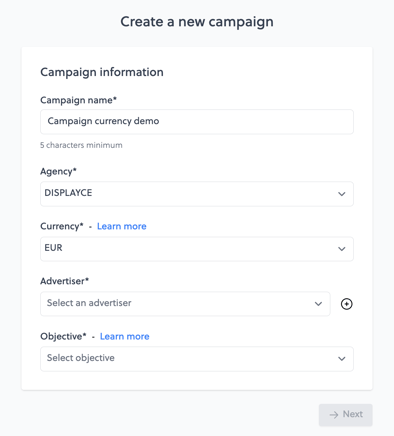
When you create a new campaign, the campaign currency field will be filled with the billing currency associated with your agency, by default. This field cannot be empty, so you will need to select a currency to proceed.
If you are creating a mono-currency campaign, we recommend aligning the campaign currency with your line items’ currency to ensure the best data visibility.
How to Edit the Campaign Currency?
You can change the Campaign Currency only if the campaign is still in Draft:
- Via the Campaign Lister: Click the Edit icon, select a new currency, then click Next and Save Campaign.
- Via the Campaign Summary: Click the Edit Campaign icon next to the Share button in the header.
What is the Line Item Currency?
The Line Item currency is the currency in which the Line Item actually responds to bid requests. It's the reference currency for bidding itself: the Line Item's native budget is set and tracked in this currency, regardless of the Campaign currency or Agency currency chosen above.
Impact on deal list (Step 3): The Line Item currency you select also filters the list of available deals in Step 3 — only deals matching that same currency will be displayed.
I17 available currencies — AUD / BRL / CAD / CHF / CNY / DKK / EUR / GBP / HKD / INR / JPY / MXN / NOK / SEK / SGD / USD / ZAR (same currencies as campaign currency)
The LI currency is editable as long as the LI is not published (status ≠ Planned / Running). Make sure to choose the right currency before publishing.
How exchange rates impact your budget?
Bid requests are always placed in Line Item currency — this never changes.
For budget tracking, the platform no longer systematically converts everything to EUR. Instead:
- Remaining/spent budget is tracked in Campaign currency
- If the Agency currency differs from both the Campaign currency and the Line Item currency, it's also tracked in Agency currency
- No conversion is forced through EUR anymore
Example: if your Line Item and your Campaign are both set in USD, your remaining budget is calculated natively in USD — no EUR conversion applies. Your campaign spends through its full real budget in native currency.
This removes the previous risk where a campaign could stop spending early: before, if EUR strengthened against your Line Item's currency, the EUR-equivalent budget could be reached (and stop the campaign) even though the budget wasn't fully spent in the original currency. This no longer happens.
Reporting in multiple currencies
Reports can be tracked in Agency currency, Campaign currency, or Line Item currency, updating automatically based on the currency selected.
- By default, reports open in Campaign currency.
- Line Item currency view is only available when the campaign has a single Line Item currency. If the campaign includes several different Line Item currencies (multi-currency campaign), the Line Item currency view remains empty — this is expected behavior, not a bug, since there's no longer a single common currency to build the dashboard on.
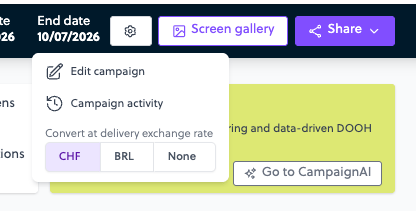
💡 To switch the display currency, use the ⚙️ Edit campaign icon at the top of the campaign page, under "Convert at delivery exchange rate." If Agency currency, Campaign currency, and Line Item currency are all identical, no conversion choice is shown — there's nothing to convert.
FAQ
Why isn't my USD budget limited by the EUR equivalent anymore?
→ Because budget tracking is now native in campaign currency, with no forced EUR conversion.
Can I change a Line Item's currency after it moves to Running?
→ No, the LI currency is locked as soon as it's published.
Why is my reporting empty in LI currency?
→ The campaign contains several different LI currencies; this view is only available for single-LI-currency campaigns.
What does the "None" option do in the ⚙️ selector?
→ It displays values with no conversion, directly in Line Item currency.
Why don't I see more deals in Step 3?
→ Deals are filtered by your Line Item currency — only deals in the same currency will appear. If you are missing deals you expect to see, check whether they were set up in a different currency.