
How Trend is Calculated
1. Key Metrics
| Metric | Formula | Description |
| spentAchieve |
(spentEuro / campaignBudget) × 100 |
Percentage of the total budget already spent.
|
| timeAchieve |
(activeHoursElapsed / totalActiveHours) × 100 |
Percentage of the campaign's active hours that have elapsed. Each hour of the day is counted only if it is enabled by the line items' dayparting settings (step 1).
|
| Trend Ratio |
spentAchieve / timeAchieve |
Compares spending progress to time progress.
|
Note: At the very start of a campaign (first active hour), timeAchieve = 0. The Trend status will display as 'Planned' until the first active hour has elapsed. After that, the normal calculation applies.
2. Status Definitions
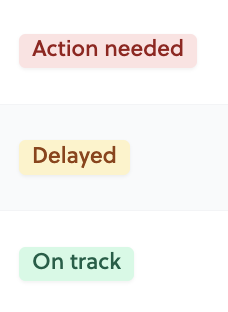
The Trend status is determined by the Trend Ratio (spentAchieve / timeAchieve):
| Status | Condition | Interpretation |
| Action needed | Ratio ≤ 0.85 | The campaign is spending too slowly compared to the expected pace. |
| Delayed | Ratio > 0.85 and ≤ 0.95 | The campaign is spending slightly slower than expected. |
| On track | Ratio > 0.95 | The campaign is spending as expected. |
Example
Let’s say your campaign has:
- Budget: 1,000 €
- Calendar duration: 7 days (Monday to Sunday)
- Dayparting: Saturday and Sunday excluded → 5 active days = 120 active hours
- Current moment: Wednesday at 11:00 AM (day 3, after 2 full active days + 11 hours)
- Spent so far: 500 €
Calculations:
activeHoursElapsed: 2 days × 24h + 11h = 59 active hourstotalActiveHours: 5 days × 24h = 120 active hoursspentAchieve: (500 / 1,000) × 100 = 50%timeAchieve: (59 / 120) × 100 = 49.2%Trend Ratio: 50 / 49.2 = 1.02 → On Track
Campaign shows as Running while Trend is Finished
In some cases, a campaign's Trend may display as Finished while the line item still appears as Running. This happens when dayparting prevents any further buying during the remaining hours of the last calendar day.
Example: a line item running from May 1 to May 11, with dayparting set to 8:00–10:00 AM only. On May 11 at 11:00 AM, all active hours have elapsed: the Trend shows Finished. However, since May 11 is still ongoing, the line item status remains Running.
This is expected behaviour. The Trend reflects active hours elapsed, while the line item status is based on the calendar end date.
Why Trend Matters
- Action Needed: Your campaign risks under-spending. Consider adjusting your targeting or budgets to accelerate spending.
- Delayed: Monitor closely; minor adjustments may be needed.
- On Track: No action required. The campaign is performing as expected.